

Choose a modded Game Boy Color if your collection is mainly Game Boy and Game Boy Color cartridges and you enjoy its one-piece design. Choose a modded GBA SP if you also want Game Boy Advance games, a folding screen and a rechargeable battery included. The newer console is not automatically the better purchase: the useful differences depend on what you intend to play.
This comparison uses two restored Nintendo consoles from GemuBoy's catalogue: the Game Boy Color IPS Yellow Edition and the transparent purple GBA SP IPS Gengar Edition. Their original screens have been replaced, so a comparison based only on Nintendo's original displays would miss the point.
Game Boy Color IPS vs GBA SP IPS: the buying differences
| What matters to you | Game Boy Color IPS | GBA SP IPS |
|---|---|---|
| Game library | Game Boy and Game Boy Color | GBA plus almost all GB and GBC games |
| Body design | One-piece vertical handheld | Compact folding handheld |
| Older games on screen | Display built around the GB/GBC format | Normal or stretched display using L/R |
| Power | AA batteries or a USB-C battery variant | 1040 mAh rechargeable battery on the example shown |
| Headphones | Built-in headphone socket | Adapter required with Nintendo's original connectors |
| Travel | Exposed screen: protection recommended | Screen covered when folded closed |
If you are deciding between the two Advance models, our Game Boy Advance vs GBA SP guide addresses that choice. Here, the question is whether a Color or an SP better suits a GB/GBC collection.
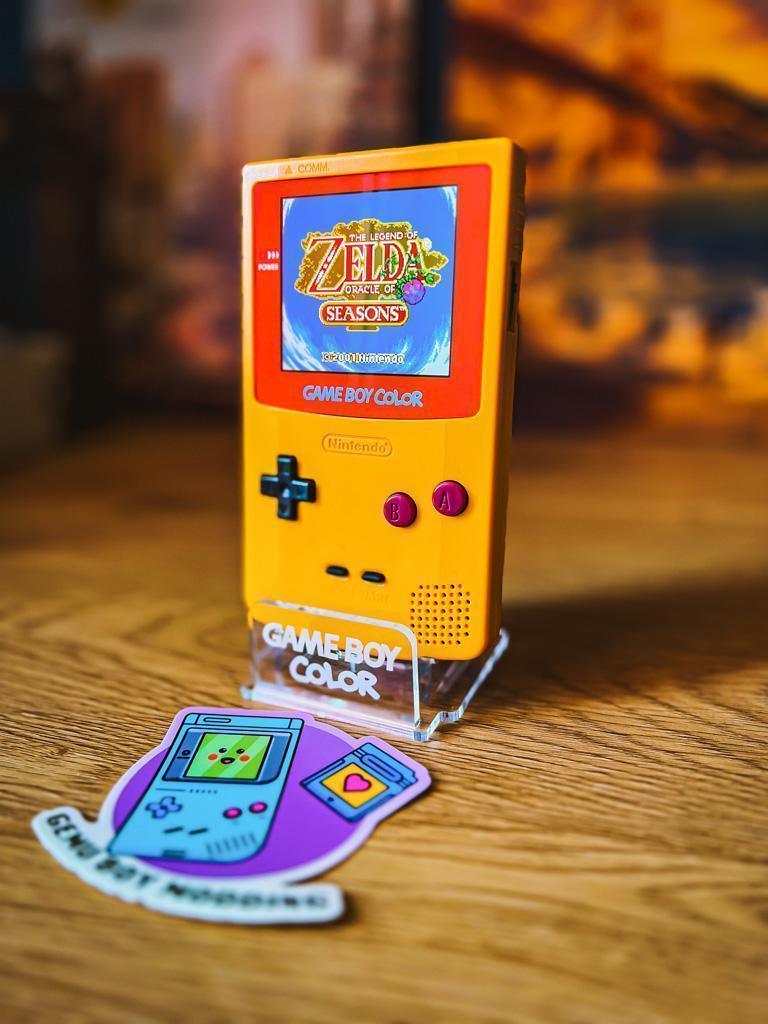
GemuBoy's Yellow Edition Game Boy Color: a one-piece body with an IPS display.
When a Game Boy Color IPS makes sense
The Color suits players who want the shape of that generation, with the screen above the controls and no hinge. A library made entirely of GB and GBC games is a complete reason to choose it; you do not need plans to collect GBA titles.
The Yellow Edition retains an original Nintendo motherboard that has been cleaned, restored and tested. Its shell, buttons and membranes are replaced. The IPS configuration has a viewing area 25% larger than the original GBC screen, a retro pixel mode and a customisable illuminated logo. That 25% figure compares the modified Color with the original Color, not with a GBA SP. It does not establish which console in this comparison displays an older game at the larger physical size.
You can choose rechargeable power without choosing an SP
The Yellow Edition offers separate AA-powered and USB-C battery variants. Choose AA power if replaceable batteries fit your routine, or select the rechargeable variant if that is more convenient. USB-C is an option to check when ordering, rather than something guaranteed by a particular shell colour.
Our Game Boy Color AA batteries vs USB-C guide explains that decision. A rechargeable battery changes the power arrangement; it does not add GBA game compatibility.
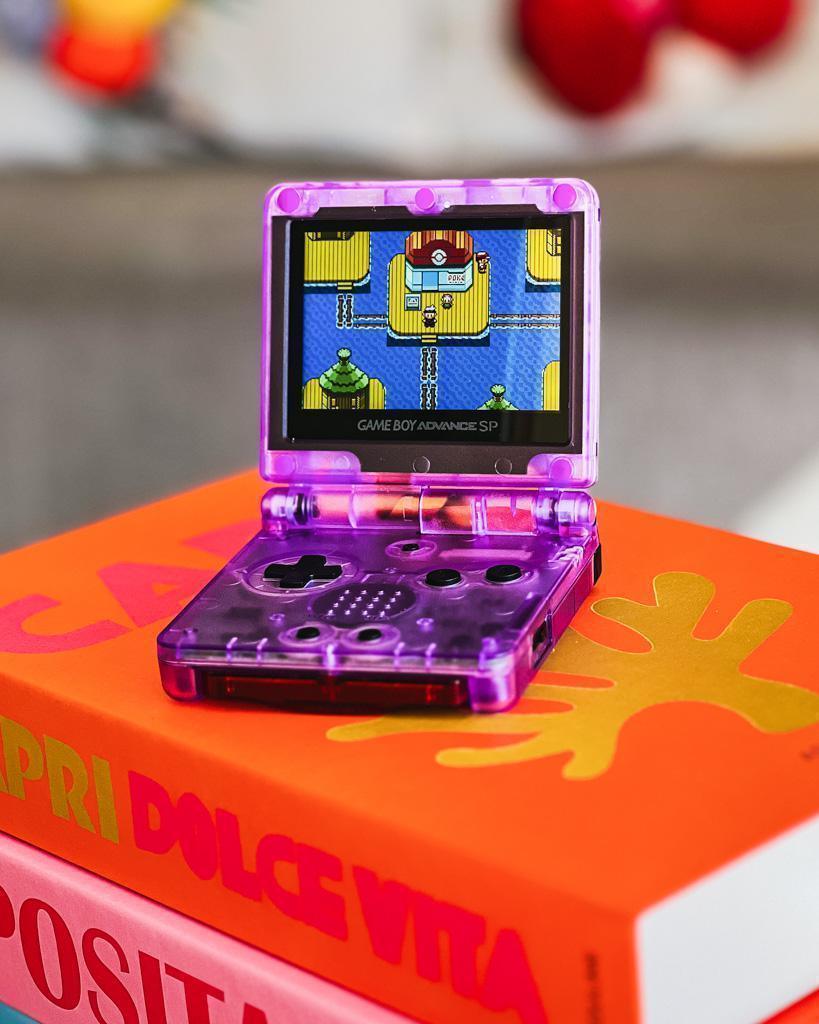
GemuBoy's GBA SP Gengar Edition, with a transparent purple shell and folding IPS screen.
When the GBA SP IPS is the better fit
The SP is useful if you already own GBA cartridges or want to add them later. A Game Boy Color cannot play that generation of games. Before choosing, make two lists: the GB/GBC games you genuinely expect to play, and the GBA games that would justify expanding your collection.
The folding body is its other practical benefit. Closing it covers the display, and the hinge lets you adjust the viewing angle while playing. A protective case is still sensible in a bag. Also remember to switch the system off: closing a GBA SP does not automatically put it to sleep or turn it off.
The Gengar model shown has an IPS screen with 15 brightness settings and a scanlines filter, plus an installed 1040 mAh rechargeable battery. Its charger and games are not included. Optional RGB lighting is a separate configuration choice; lighting around the controls should not be confused with the screen's backlight.
For headphones, budget for the appropriate adapter. An SP retaining Nintendo's original connectors does not have the Color's direct headphone socket. See our GBA SP headphone adapter guide before choosing accessories. Buyers outside Europe should also verify that any charger they select suits their local electrical supply and sockets.
Compare the picture format, not just the brightness settings
For GB/GBC cartridges, the SP's L/R buttons switch between normal and stretched display modes. Stretching fills more horizontal space but changes the picture's proportions. Start with normal mode when deciding whether you like the presentation.
GemuBoy's current GBC IPS configuration has 8 brightness levels; its SP IPS configuration has 15. These are adjustment steps, not comparable measurements of maximum brightness, colour accuracy or image size. More settings alone do not make one screen better for your games.
The Color's pixel mode and the SP's scanlines filter affect how the image is presented. Neither rewrites a game's graphics nor increases its performance. The photographs here show different games: they illustrate the consoles and their formats, rather than a controlled comparison of screen colours.
Three questions to answer before buying
- Will you actually play GBA games? If yes, the SP combines those with most of your GB/GBC library. If not, that extra compatibility may bring little practical benefit.
- Which body shape suits your hands and travel habits? Consider the Color's one-piece layout against the SP's folding body and adjustable screen. Comfort is personal.
- Which accessories will you carry? Check the selected power variant, charger and headphone connection. For unusual cartridges, link play or specialist peripherals, verify the exact combination rather than assuming all backward-compatible features behave identically.
Our recommendation for your collection
For a GB/GBC-focused collection, choose the Color IPS if you prefer its shape. For a collection that includes GBA games, choose the SP IPS if you want one handheld for those generations. Then choose the finish you like. Yellow and transparent purple are examples, not requirements for these display features.

Compare the configurations and options on each product page before ordering.
Shop modded Game Boy Color consoles Shop modded GBA and GBA SP consoles
Frequently asked questions
Can a Game Boy Color IPS play GBA games?
No. Replacing the screen does not add GBA compatibility to the original Game Boy Color motherboard.
Do I need an SP to get a rechargeable battery?
No. The GBC model compared here offers a USB-C battery variant. Check which option you select; it is not included with the AA-powered variant.
Does an IPS mod improve the game's graphics?
It improves visibility and changes the display presentation. It does not redraw the game's artwork, add content or make the cartridge run faster.
Is the Color always more comfortable?
No. Your grip, hand spacing and preferred viewing angle matter. Try both formats if possible rather than relying on a universal comfort ranking.
Adapted from our French GB/GBC console comparison. Product configurations checked against GemuBoy's catalogue on 26 October 2026. Original GemuBoy photographs: Yellow Edition GBC and transparent purple SP Gengar. Displayed games are not included. Technical references: Nintendo GBA SP compatibility and connections and the Nintendo GBA SP manual, sections 5–6.